$$PLAIN_TEXT_PREVIEW$$
Live Your Story with Stacy Julian

Hey Friend, Happy Friday!

Hopefully you’re practicing your iOS18 finding techniques by using more natural language in your searches AND asking for easily indexed objects and information found in meta data.

Today I want to take a LOOK 👀 at Search Results and remind you how important it is for YOU to spend time on your iPhone with your photos!


Search Results

I tapped on the 🔎 search tool and typed the words, “Palm tree in Mexico.” Let’s took a look at the results window— in general and then specifically to my search …

  • A total of 111 AI-matched photos, which may or may not meet with my approval

  • A selection of 10 images that iOS18 believes are ‘Top Results’ (more information below)

  • A floating window that displays a breakdown of matching files. In this case I have 94 photos taken in Mexico that feature a palm tree. I also have 4 photos that feature a palm tree and the word, “Mexico”

  • One or more “Memories” or mini movies (as you swipe left) relevant to my search

What exactly are Top Results?

Apple Photos determines "Top Results" in search by analyzing your photo library through a process called indexing, where it identifies people, places, objects, and text within each image—it automatically selects for variety of images—serving up people—alone and in groups, landscape, objects, light and dark contrast and photos that have been favorited.


Just for FUN I uploaded one of the Memories AI generated from my “Palm Tree in Mexico” search.

Click HERE to watch!

Notice how many group photos are in this short clip—these results motivated me to delete two additional

Here’s the take away: On-device (machine) learning pays attention to how YOU interact with YOUR photos. Which photos do you view, favorite, and add captions to? Which photos do you move into albums and share? The MORE time you spend in your Photos app, the better your personal iOS18 algorithm and experience becomes!

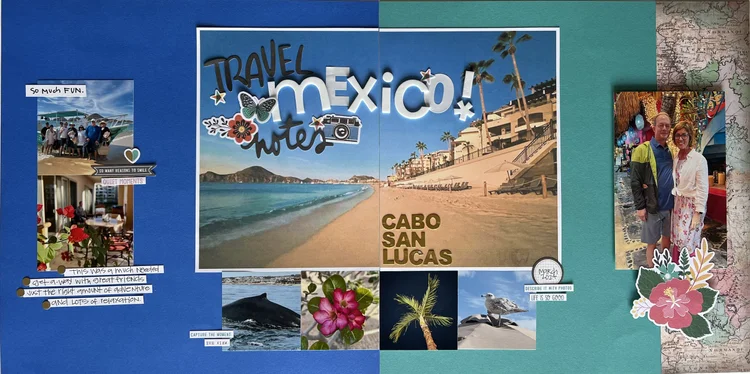
One of the 4 images that matched for a palm tree and the text, “Mexico” was this scrapbook page. My iPhone truly can be my scrapbook album—more on this very soon!


Rock Your Scroll course login

To enter the Rock Your Scroll 2025 course page, simply click the orange button below and use the password: JOYonmyphone

Please NOTE: THE J-O-Y are capital letters and the rest are lower case.

 Rock Your Scroll Login 

Password: JOYonmyphone

If you need to log in again, click on the Courses tab on my website, www.stacyjulian.com. Scroll down to where all the course logins are located (look for circles!) and click on Rock Your Scroll 2025. Then enter the password and ready to rock!

 
Live Your Story with Stacy Julian
pinterest facebook facebook instagram

Stacy Julian LLC, 21601 E. Mill River Ln, Liberty Lake, WA 99019, United States

Unsubscribe