$$PLAIN_TEXT_PREVIEW$$
Live Your Story with Stacy Julian

Hello Rock Your Scroll Friend,

Let’s get a jump start on Lesson 4, when we will review Collections and explore Albums. The BEST place to start is always with people …

…Your People!

The Photos app on your iPhone scans your photos to help you quickly recognize the people, scenes, and objects within the photos. This is how it creates a dynamic collection of individuals that pop up frequently in your Photos Library.

People is a collection available in your Floating Toolbar

IF you currently have “People” unselected, you’ll need to scroll to the bottom of the Floating Toolbar, tap “Customize & Reorder” and select it. Here are three things you can do to improve the presentation of your People …

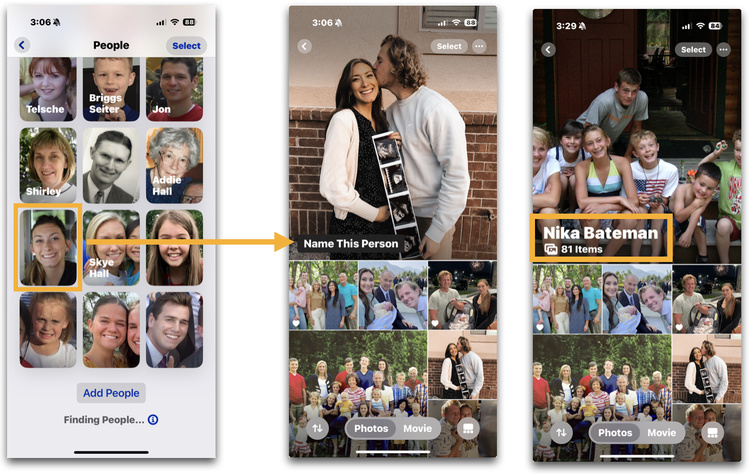
ONE. Start by tapping the > (extender arrow) next to “People” so you can scroll down through faces until you find one that needs a name. When you tap on the face, their section of this collection will open and you’ll see “Name This Person.” Tap this and type their name!

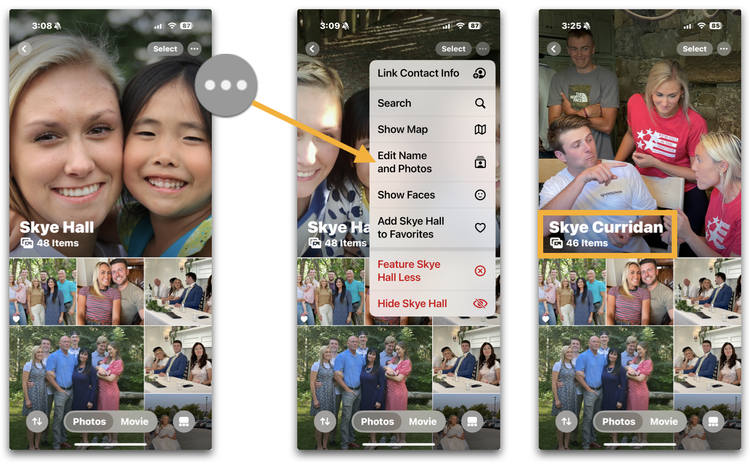
TWO. Locate a name that you’d like to change. My niece, Skye is now married, so I need to update her surname. To do this, I’ll tap on her face and then tap on the More Button (3 dots) to open a menu where I can select “Edit Name and Photos.” Tap and make adjustments here!

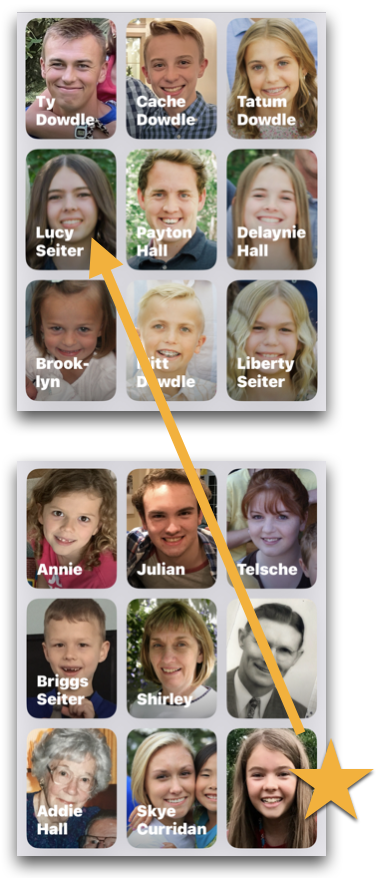
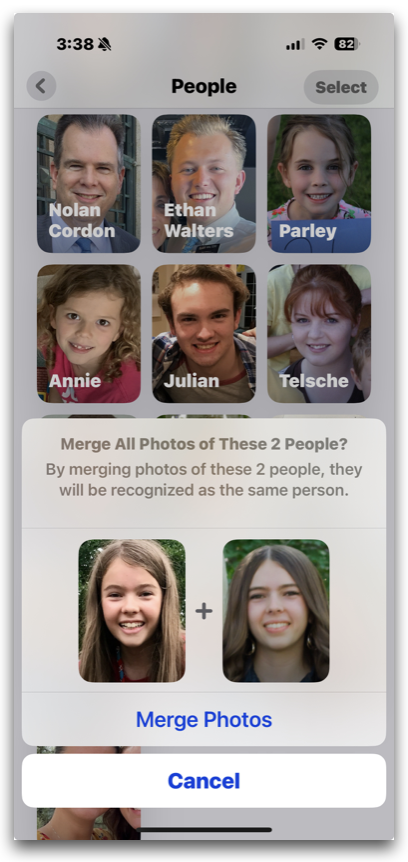
THREE. You may find that People shows you the same person twice—or even three times in your list. To remedy this, tap “Select” in the top right corner of your iPhone screen and then tap on both or all of these faces …

… Tap the more button and select “Merge Photos”

❤️ Your assignment today is to spend some time with Your People and see what you can learn! Practice naming or re-naming faces you love and help iOS18 out by merging faces together that are actually one and the same!


🎶Thank YOU for being one of the PEOPLE on my Rock Your Scroll list!


Rock Your Scroll course login

To enter the Rock Your Scroll 2025 course page, simply click the orange button below and use the password: JOYonmyphone

Please NOTE: THE J-O-Y are capital letters and the rest are lower case.

 Rock Your Scroll Login 

Password: JOYonmyphone

If you need to log in again, click on the Courses tab on my website, www.stacyjulian.com. Scroll down to where all the course logins are located (look for circles!) and click on Rock Your Scroll 2025. Then enter the password and ready to rock!

 
Live Your Story with Stacy Julian
pinterest facebook facebook instagram

Stacy Julian LLC, 21601 E. Mill River Ln, Liberty Lake, WA 99019, United States

Unsubscribe