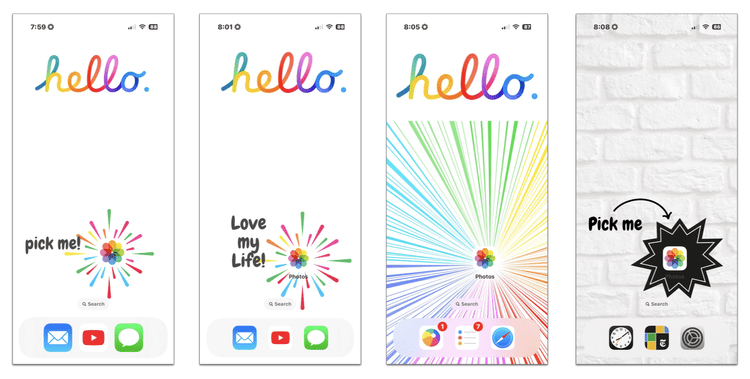
BEGIN to embrace iOS18 customization opportunities by redesigning the Home Screen on your iPhone.
REMEMBER that this redesign should prominently feature your Photos app and hide most if not all of your remaining apps. If you need to follow along (again) with this process, fast-forward the replay video to minute 56:00 or read this Apple Support article.
CREATE 3 or more sticky note reminders about WHY you’re choosing to follow-thru on this course.
PLACE these sticky notes around your home!
Don’t forget you can download the 4 images I designed for home screens in the classroom as well!
I’m so delighted you’re on this journey to ♬📲 JIVE with me!
Rock Your Scroll course login
To enter the Rock Your Scroll 2025 course page, simply click the orange button below and use the password: JOYonmyphone
Please NOTE: THE J-O-Y are capital letters and the rest are lower case.
If you need to log in again, click on the Courses tab on my website, www.stacyjulian.com. Scroll down to where all the course logins are located (look for circles!) and click on Rock Your Scroll 2025. Then enter the password and ready to rock!