<!doctype html>
<html xmlns="http://www.w3.org/1999/xhtml" xmlns:v="urn:schemas-microsoft-com:vml" xmlns:o="urn:schemas-microsoft-com:office:office" lang="en-US" xml:lang="en-US">
  <head>
    <title data-ignore-plain-text>NEW: Live Your Story Recap &hellip;</title>
    <meta http-equiv="content-type" content="text/html; charset=utf-8">
    <meta name="viewport" content="width=device-width, initial-scale=1, maximum-scale=1">
    <meta name="format-detection" content="address=no">
    <!--[if (gte mso 9)|(IE)]>
    <style type="text/css" media="screen">
      li {
        text-indent: -1em;
      }
    </style>
    <![endif]-->
    <style type="text/css" media="all">
      body,
.section-text-area,
.section-text-area-wrapper,
.section-text-cell {
    overflow-wrap: break-word;
    word-wrap: break-word;
    -ms-word-break: break-all;
    word-break: break-word;
}
body {
    width: 100% !important;
    min-width: 100% !important;
    -ms-text-size-adjust: none;
    -webkit-text-size-adjust: none;
    mso-line-height-rule: exactly;
}
p {
    margin-block: 0;
}
@media only screen and (max-width:  593px ) {
    table#newsletter-table {
        border: 0 !important;
    }
    table#newsletter-email {
        width: 100% !important;
    }
    img.section-scaleable-image,
    img.section-empty-img {
        max-width: 100% !important;
        height: auto !important;
    }
    .bg-none {
        background: none !important;
    }
    .hauto {
        height: auto !important;
    }
    .show-desktop-only {
        display: none !important;
    }
    .show-mobile-only {
        display: block !important;
        float: none !important;
        line-height: auto !important;
        max-height: inherit !important;
        max-width: inherit !important;
        margin-top: 0px !important;
        overflow: visible !important;
        visibility: inherit !important;
        width: auto !important;
    }
    .stack-cell-wrap {
        display: block !important;
    }
    .stack-cell-up {
        display: table-header-group !important;
    }
    .stack-cell-down {
        display: table-footer-group !important;
    }
    .mw100p {
        max-width: 100% !important;
    }
    .section-horizontal-padding,
    .padding-mobile-both {
        padding-left: 22px !important;
        padding-right: 22px !important;
    }
    .padding-mobile-left {
        padding-left: 22px !important;
    }
    .padding-mobile-right {
        padding-right: 22px !important;
    }
    .text-left {
        text-align: left !important;
    }
    .text-right {
        text-align: right !important;
    }
    .w100p {
        width: 100% !important;
    }
}
.button-style-solid:hover,
.button-style-rounded:hover {
    opacity: .8 !important;
}
a:hover {
    text-decoration: none !important;
}
span.mail-merge-preview {
    border-bottom: 2px dotted currentColor;
    display: inline-block;
    line-height: 1em !important;
    margin-bottom: .125em !important;
}
table#newsletter-section-body .linked-site-title-link {
    color: #59c0bc !important;
}
#header-header-section-stacked-top-0 .brand-name .linked-site-title-link {
    color: #363636;
    text-decoration: none;
}
#footer-footer-section-stacked-top-0 .brand-name .linked-site-title-link {
    color: #363636;
    text-decoration: none;
}
#footer-footer-section-stacked-top-0 .footer-text .linked-site-title-link {
    color: #59c0bc;
}
body.renderedPreview #line-line-section-2 div.basic-line[data-line="dashed"] {
    border-width: .5px 0 !important;
}
body.renderedPreview #line-line-section-7 div.basic-line[data-line="dashed"] {
    border-width: .5px 0 !important;
}
body.renderedPreview #line-line-section-10 div.basic-line[data-line="dashed"] {
    border-width: .5px 0 !important;
}
body.renderedPreview #line-line-section-16 div.basic-line[data-line="dashed"] {
    border-width: .5px 0 !important;
}
body.renderedPreview #line-line-section-18 div.basic-line[data-line="dashed"] {
    border-width: .5px 0 !important;
}

    </style>
    
    
    <!--[if mso]>
    <noscript>
      <xml>
        <o:OfficeDocumentSettings>
          <o:AllowPNG/>
          <o:PixelsPerInch>96</o:PixelsPerInch>
        </o:OfficeDocumentSettings>
      </xml>
    </noscript>
    <![endif]-->
    
    <!--[if (mso)|(mso 16)]>
      <style type="text/css">
        a {text-decoration: none;}
      </style>
    <![endif]-->
  </head>
  <body style="padding:0;margin:0;text-align:center;background-color:#cce3e5;">
    <table role="article" aria-label="NEW: Live Your Story Recap &hellip;" lang="en-US" cellpadding="0" cellspacing="0" border="0" align="center" id="newsletter-table" style="font-size:16px;font-weight:normal;width:100%;padding:0px;background-color:#cce3e5;border-top:44px solid #cce3e5;border-bottom:44px solid #cce3e5;margin:0 auto;text-align:center;table-layout:fixed;">
  <tbody><tr>
    <td align="center" valign="top" bgcolor="#CCE3E5" id="newsletter-cell" style="font-size:.9375em;">
      <div data-ignore-plain-text class="newsletter-preview-text" style="color:transparent;display:none !important;height:0;max-height:0;max-width:0;opacity:0;overflow:hidden;mso-hide:all;visibility:hidden;width:0;">
        
            
            with Melissa Gross!͏‌&nbsp;͏‌&nbsp;͏‌&nbsp;͏‌&nbsp;͏‌&nbsp;͏‌&nbsp;͏‌&nbsp;͏‌&nbsp;͏‌&nbsp;͏‌&nbsp;͏‌&nbsp;͏‌&nbsp;͏‌&nbsp;͏‌&nbsp;͏‌&nbsp;͏‌&nbsp;͏‌&nbsp;͏‌&nbsp;͏‌&nbsp;͏‌&nbsp;͏‌&nbsp;͏‌&nbsp;͏‌&nbsp;͏‌&nbsp;͏‌&nbsp;͏‌&nbsp;͏‌&nbsp;͏‌&nbsp;͏‌&nbsp;͏‌&nbsp;͏‌&nbsp;͏‌&nbsp;͏‌&nbsp;͏‌&nbsp;͏‌&nbsp;͏‌&nbsp;͏‌&nbsp;͏‌&nbsp;͏‌&nbsp;͏‌&nbsp;͏‌&nbsp;͏‌&nbsp;͏‌&nbsp;͏‌&nbsp;͏‌&nbsp;͏‌&nbsp;͏‌&nbsp;͏‌&nbsp;͏‌&nbsp;͏‌&nbsp;͏‌&nbsp;͏‌&nbsp;͏‌&nbsp;͏‌&nbsp;͏‌&nbsp;͏‌&nbsp;͏‌&nbsp;͏‌&nbsp;͏‌&nbsp;͏‌&nbsp;͏‌&nbsp;͏‌&nbsp;͏‌&nbsp;͏‌&nbsp;͏‌&nbsp;͏‌&nbsp;͏‌&nbsp;͏‌&nbsp;͏‌&nbsp;͏‌&nbsp;͏‌&nbsp;͏‌&nbsp;͏‌&nbsp;͏‌&nbsp;͏‌&nbsp;͏‌&nbsp;͏‌&nbsp;͏‌&nbsp;͏‌&nbsp;͏‌&nbsp;͏‌&nbsp;͏‌&nbsp;͏‌&nbsp;͏‌&nbsp;͏‌&nbsp;͏‌&nbsp;͏‌&nbsp;͏‌&nbsp;͏‌&nbsp;͏‌&nbsp;͏‌&nbsp;͏‌&nbsp;͏‌&nbsp;͏‌&nbsp;͏‌&nbsp;͏‌&nbsp;͏‌&nbsp;͏‌&nbsp;͏‌&nbsp;͏‌&nbsp;͏‌&nbsp;͏‌&nbsp;͏‌&nbsp;͏‌&nbsp;͏‌&nbsp;͏‌&nbsp;͏‌&nbsp;͏‌&nbsp;͏‌&nbsp;͏‌&nbsp;͏‌&nbsp;͏‌&nbsp;͏‌&nbsp;͏‌&nbsp;͏‌&nbsp;͏‌&nbsp;͏‌&nbsp;͏‌&nbsp;͏‌&nbsp;͏‌&nbsp;͏‌&nbsp;͏‌&nbsp;͏‌&nbsp;͏‌&nbsp;͏‌&nbsp;͏‌&nbsp;͏‌&nbsp;͏‌&nbsp;͏‌&nbsp;͏‌&nbsp;͏‌&nbsp;͏‌&nbsp;͏‌&nbsp;͏‌&nbsp;͏‌&nbsp;͏‌&nbsp;͏‌&nbsp;͏‌&nbsp;͏‌&nbsp;͏‌&nbsp;͏‌&nbsp;͏‌&nbsp;͏‌&nbsp;͏‌&nbsp;͏‌&nbsp;͏‌&nbsp;͏‌&nbsp;͏‌&nbsp;͏‌&nbsp;͏‌&nbsp;͏‌&nbsp;͏‌&nbsp;͏‌&nbsp;͏‌&nbsp;͏‌&nbsp;͏‌&nbsp;͏‌&nbsp;͏‌&nbsp;͏‌&nbsp;͏‌&nbsp;͏‌&nbsp;͏‌&nbsp;͏‌&nbsp;͏‌&nbsp;͏‌&nbsp;͏‌&nbsp;͏‌&nbsp;͏‌&nbsp;͏‌&nbsp;͏‌&nbsp;͏‌&nbsp;͏‌&nbsp;͏‌&nbsp;͏‌&nbsp;͏‌&nbsp;͏‌&nbsp;͏‌&nbsp;͏‌&nbsp;͏‌&nbsp;͏‌&nbsp;͏‌&nbsp;͏‌&nbsp;͏‌&nbsp;͏‌&nbsp;͏‌&nbsp;͏‌&nbsp;͏‌&nbsp;͏‌&nbsp;͏‌&nbsp;͏‌&nbsp;͏‌&nbsp;͏‌&nbsp;͏‌&nbsp;͏‌&nbsp;͏‌&nbsp;͏‌&nbsp;͏‌&nbsp;͏‌&nbsp;͏‌&nbsp;͏‌&nbsp;͏‌&nbsp;͏‌&nbsp;͏‌&nbsp;͏‌&nbsp;͏‌&nbsp;͏‌&nbsp;͏‌&nbsp;͏‌&nbsp;͏‌&nbsp;͏‌&nbsp;͏‌&nbsp;͏‌&nbsp;͏‌&nbsp;͏‌&nbsp;͏‌&nbsp;͏‌&nbsp;͏‌&nbsp;͏‌&nbsp;͏‌&nbsp;͏‌&nbsp;͏‌&nbsp;͏‌&nbsp;͏‌&nbsp;͏‌&nbsp;͏‌&nbsp;͏‌&nbsp;͏‌&nbsp;͏‌&nbsp;͏‌&nbsp;͏‌&nbsp;͏‌&nbsp;͏‌&nbsp;͏‌&nbsp;͏‌&nbsp;͏‌&nbsp;͏‌&nbsp;͏‌&nbsp;͏‌&nbsp;͏‌&nbsp;͏‌&nbsp;͏‌&nbsp;͏‌&nbsp;͏‌&nbsp;͏‌&nbsp;͏‌&nbsp;͏‌&nbsp;͏‌&nbsp;͏‌&nbsp;͏‌&nbsp;͏‌&nbsp;͏‌&nbsp;͏‌&nbsp;͏‌&nbsp;͏‌&nbsp;͏‌&nbsp;
        
      </div>
      <table border="0" cellpadding="0" cellspacing="0" width="594" bgcolor="#FDFDFC" id="newsletter-email">
        <tbody><tr>
          <td align="center" valign="top" id="newsletter-email-wrapper" class="modern-sans">
            <table role="presentation" width="100%" cellpadding="0" cellspacing="0" border="0" id="newsletter-section-header">
              <tbody><tr>
                <td align="center" valign="middle" id="newsletter-section-header-cell">
                  
<div id="header-header-section-stacked-top-0">


<table role="presentation" width="100%" cellpadding="0" cellspacing="0" border="0" bgcolor="transparent" class="section-content header-section header-section-stacked" style="background-color:transparent;">
  <tbody><tr>
    <td align="center" valign="middle" class="section-text-area section-content-cell" style="padding-top:22px;padding-right:26px;padding-bottom:22px;padding-left:26px;">


      <a class="brand-logo-link" href="https://www.stacyjulian.com/" style="color:#59c0bc !important;"><img class="brand-logo" src="https://images.squarespace-cdn.com/content/v1/5481fab0e4b01afce4484c6a/4cefdfa7-087e-4ee3-b3f3-20d5aaa1b3b7/LYS-Logo-Final.png" height="82" alt="Live Your Story with Stacy Julian" style="font-size:.625em;display:block;border:0;text-decoration:none;line-height:0;font-weight:normal;font-family:'DejaVu Sans Condensed', 'Liberation Sans', 'Nimbus Sans L', 'Helvetica Neue', Helvetica, Arial, sans-serif;color:#363636;height:auto;max-height:82px;max-width:100%;width:auto;"></a>


    </td>
  </tr>
</tbody></table>

</div>
                </td>
              </tr>
            </tbody></table>
            <table role="presentation" width="100%" cellpadding="0" cellspacing="0" border="0" id="newsletter-section-body">
              <tbody><tr>
                <td align="center" valign="top" width="100%" id="newsletter-section-body-cell">
                  
<div id="image-image-section-below-0">
<table role="presentation" width="100%" cellpadding="0" cellspacing="0" border="0" bgcolor="transparent" class="image-section below-layout section-content">


    <tbody><tr>
      <td>
        <table role="presentation" width="100%" cellpadding="0" cellspacing="0" border="0">
          <tbody><tr>
              

            <td align="left" valign="middle" class="section-image-cell section-content-cell section-hoverable-image" data-aspect="ORIGINAL" style="padding:0;">
              
  <img class="section-scaleable-image" src="https://images.squarespace-cdn.com/content/5481fab0e4b01afce4484c6a/56cfa283-669f-4b60-ae33-ce5b7291f431/Screen+Shot+2022-07-08+at+8.10.20+AM.png?content-type=image%2Fpng&amp;format=750w" width="594" alt="" style="font-size:.625em;display:block;border:0;text-decoration:none;line-height:0;background-color:transparent;font-weight:normal;height:auto;width:100%;max-width:100%;font-family:'DejaVu Sans Condensed', 'Liberation Sans', 'Nimbus Sans L', 'Helvetica Neue', Helvetica, Arial, sans-serif;">


            </td>
              

          </tr>
        </tbody></table>
      </td>
    </tr>


</tbody></table>

</div>
<div id="text-text-section-1">


<table role="presentation" width="100%" cellpadding="0" cellspacing="0" border="0" bgcolor="transparent" class="text-section section-content">
  <tbody><tr>
    <td valign="top" class="section-text-area section-content-cell padding-mobile-right" style="padding-top:20px;padding-right:40px;padding-bottom:11px;padding-left:26px;color:#e75a36;background-color:transparent;">
      <h3 style="color:inherit;margin:1.414em 0 .5em;font-weight:400;line-height:1.25em;font-size:2.109375em;mso-line-height-alt:2.109375em;margin-top:0;margin-bottom:0;font-family:'DejaVu Sans Condensed', 'Liberation Sans', 'Nimbus Sans L', 'Helvetica Neue', Helvetica, Arial, sans-serif;letter-spacing:0em;text-align:center;"><strong>Workflow Wednesday</strong> July 2022</h3>
    </td>
  </tr>
</tbody></table>

</div>
<div id="line-line-section-2">

<table role="presentation" width="100%" cellpadding="0" cellspacing="0" border="0" bgcolor="transparent" class="line-section section-content">
  <tbody><tr>
    <td align="center" valign="middle" width="100%">
      <table role="presentation" width="100%" cellpadding="0" cellspacing="0" border="0" class="line-section-table section-content" style="width:84%;min-width:84%;">
        <tbody><tr>
          <td align="center" valign="middle" class="section-content-cell" width="100%" style="padding-top:15px;padding-right:0;padding-bottom:22px;padding-left:0;">
            <div class="basic-line" data-line="solid" style="background:none;font-size:0;margin:0;line-height:0;height:0;width:100%;border-style:solid none;border-width:1px 0 0px;border-color:#afafaf;">&nbsp;</div>
          </td>
        </tr>
      </tbody></table>
    </td>
  </tr>
</tbody></table>

</div>
<div id="text-text-section-3">


<table role="presentation" width="100%" cellpadding="0" cellspacing="0" border="0" bgcolor="transparent" class="text-section section-content">
  <tbody><tr>
    <td valign="top" class="section-text-area section-content-cell padding-mobile-both" style="padding-top:11px;padding-right:44px;padding-bottom:11px;padding-left:44px;color:#59c0bc;background-color:transparent;">
      <h4 style="color:inherit;margin:1.414em 0 .5em;font-weight:400;line-height:1.25em;font-size:1.40625em;mso-line-height-alt:1.40625em;margin-top:0;margin-bottom:0;font-family:'DejaVu Sans Condensed', 'Liberation Sans', 'Nimbus Sans L', 'Helvetica Neue', Helvetica, Arial, sans-serif;letter-spacing:.02em;text-align:center;">Using Albums in Your Digital Library</h4>
    </td>
  </tr>
</tbody></table>

</div>
<div id="text-text-section-4">


<table role="presentation" width="100%" cellpadding="0" cellspacing="0" border="0" bgcolor="transparent" class="text-section section-content">
  <tbody><tr>
    <td valign="top" class="section-text-area section-content-cell padding-mobile-both" style="padding-top:11px;padding-right:44px;padding-bottom:11px;padding-left:44px;color:#313131;background-color:transparent;">
      <p class="" style="color:inherit;font-size:.9375em;line-height:1.618em;margin:0 0 1.25em 0;font-weight:normal;margin-top:0;font-family:'DejaVu Sans Condensed', 'Liberation Sans', 'Nimbus Sans L', 'Helvetica Neue', Helvetica, Arial, sans-serif;letter-spacing:-.01em;">Albums are a way to view a collection of digital images for a project or page or just for FUN. The term used for an album could be different depending on the software or phone app you are using. </p><p class="" style="color:inherit;font-size:.9375em;line-height:1.618em;margin:0 0 1.25em 0;font-weight:normal;font-family:'DejaVu Sans Condensed', 'Liberation Sans', 'Nimbus Sans L', 'Helvetica Neue', Helvetica, Arial, sans-serif;letter-spacing:-.01em;">Apple Photos &amp; Google Photos use albums, others may call them collections or folders. Many programs automatically create albums, like the “Recents” album in Apple Photos.</p><p class="" style="color:inherit;font-size:.9375em;line-height:1.618em;margin:0 0 1.25em 0;font-weight:normal;margin-bottom:0;font-family:'DejaVu Sans Condensed', 'Liberation Sans', 'Nimbus Sans L', 'Helvetica Neue', Helvetica, Arial, sans-serif;letter-spacing:-.01em;">During <strong>Workflow Wednesday</strong>, Stacy talked about albums that you create specifically for curating a collection of images. She shared examples using Apple Photos on her Mac desktop &amp; iPhone, but most photo programs have a similar way to create albums and Stacy encouraged us to figure out how to set up albums in the program(s) we are each using.<br></p>
    </td>
  </tr>
</tbody></table>

</div>
<div id="text-text-section-5">


<table role="presentation" width="100%" cellpadding="0" cellspacing="0" border="0" bgcolor="transparent" class="text-section section-content">
  <tbody><tr>
    <td valign="top" class="section-text-area section-content-cell padding-mobile-both" style="padding-top:11px;padding-right:44px;padding-bottom:11px;padding-left:44px;color:#59c0bc;background-color:transparent;">
      <h4 style="color:inherit;margin:1.414em 0 .5em;font-weight:400;line-height:1.25em;font-size:1.40625em;mso-line-height-alt:1.40625em;margin-top:0;margin-bottom:0;font-family:'DejaVu Sans Condensed', 'Liberation Sans', 'Nimbus Sans L', 'Helvetica Neue', Helvetica, Arial, sans-serif;letter-spacing:.02em;text-align:center;">Examples Stacy Shared</h4>
    </td>
  </tr>
</tbody></table>

</div>
<div id="text-text-section-6">


<table role="presentation" width="100%" cellpadding="0" cellspacing="0" border="0" bgcolor="transparent" class="text-section section-content">
  <tbody><tr>
    <td valign="top" class="section-text-area section-content-cell padding-mobile-both" style="padding-top:11px;padding-right:44px;padding-bottom:11px;padding-left:44px;color:#313131;background-color:transparent;">
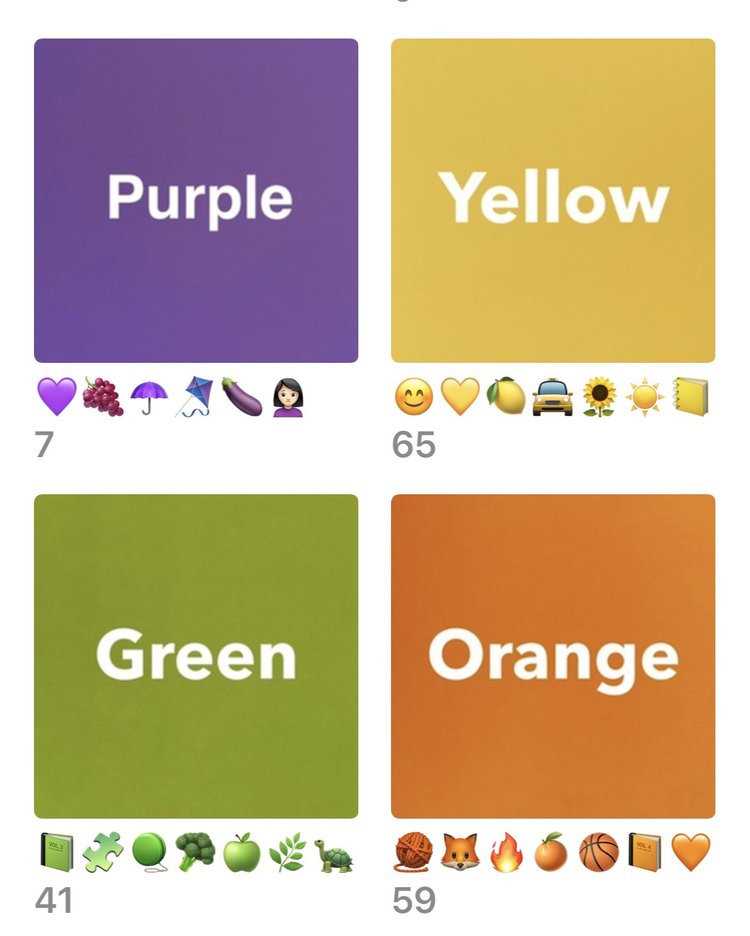
      <p class="" style="color:inherit;font-size:.9375em;line-height:1.618em;margin:0 0 1.25em 0;font-weight:normal;margin-top:0;font-family:'DejaVu Sans Condensed', 'Liberation Sans', 'Nimbus Sans L', 'Helvetica Neue', Helvetica, Arial, sans-serif;letter-spacing:-.01em;"><strong>Harry Potter</strong><br>For a growing collection of images that Stacy will use to create a page about Harry Potter in the Julian home. Who loves it, who reads it, etc. She can add images to this album over time to eventually print and create either a 2-page layout or an Extended Story. </p><p class="" style="color:inherit;font-size:.9375em;line-height:1.618em;margin:0 0 1.25em 0;font-weight:normal;font-family:'DejaVu Sans Condensed', 'Liberation Sans', 'Nimbus Sans L', 'Helvetica Neue', Helvetica, Arial, sans-serif;letter-spacing:-.01em;"><strong>Japan Trip </strong><br>This is the album Stacy used to collect and print images for last season’s Index Album project. Now that her physical album is complete, she was able to delete this album from her digital library. NOTE: Deleting the album or images from the album does NOT actually delete the images—it just removes them from that curated view.  </p><p class="" style="color:inherit;font-size:.9375em;line-height:1.618em;margin:0 0 1.25em 0;font-weight:normal;margin-bottom:0;font-family:'DejaVu Sans Condensed', 'Liberation Sans', 'Nimbus Sans L', 'Helvetica Neue', Helvetica, Arial, sans-serif;letter-spacing:-.01em;"><strong>Yellow </strong><br>Stacy has albums set up for each of her happy colors where she curates images just for FUN! Instead of naming the album yellow, she uses yellow-colored icons or emojis to create the album’s title. 😆 I’m excited to try this!!<br></p>
    </td>
  </tr>
</tbody></table>

</div>
<div id="line-line-section-7">

<table role="presentation" width="100%" cellpadding="0" cellspacing="0" border="0" bgcolor="transparent" class="line-section section-content">
  <tbody><tr>
    <td align="center" valign="middle" width="100%">
      <table role="presentation" width="100%" cellpadding="0" cellspacing="0" border="0" class="line-section-table section-content" style="width:84%;min-width:84%;">
        <tbody><tr>
          <td align="center" valign="middle" class="section-content-cell" width="100%" style="padding-top:15px;padding-right:0;padding-bottom:22px;padding-left:0;">
            <div class="basic-line" data-line="solid" style="background:none;font-size:0;margin:0;line-height:0;height:0;width:100%;border-style:solid none;border-width:1px 0 0px;border-color:#afafaf;">&nbsp;</div>
          </td>
        </tr>
      </tbody></table>
    </td>
  </tr>
</tbody></table>

</div>
<div id="text-text-section-8">


<table role="presentation" width="100%" cellpadding="0" cellspacing="0" border="0" bgcolor="transparent" class="text-section section-content">
  <tbody><tr>
    <td valign="top" class="section-text-area section-content-cell padding-mobile-both" style="padding-top:11px;padding-right:44px;padding-bottom:11px;padding-left:44px;color:#59c0bc;background-color:transparent;">
      <h4 style="color:inherit;margin:1.414em 0 .5em;font-weight:400;line-height:1.25em;font-size:1.40625em;mso-line-height-alt:1.40625em;margin-top:0;margin-bottom:0;font-family:'DejaVu Sans Condensed', 'Liberation Sans', 'Nimbus Sans L', 'Helvetica Neue', Helvetica, Arial, sans-serif;letter-spacing:.02em;text-align:center;">💜💛 Color Markers 💚🧡</h4>
    </td>
  </tr>
</tbody></table>

</div>
<div id="image-image-section-side-9">
<table role="presentation" width="100%" cellpadding="0" cellspacing="0" border="0" align="center" bgcolor="transparent" class="image-section side-layout section-content" style="width:100% !important;">

  
  <tbody><tr>
    <td class="spacing-above" height="44"></td>
  </tr>


    <tr><td><table role="presentation" width="100%" cellpadding="0" cellspacing="0" border="0" align="center" bgcolor="transparent" class="side-layout" style="width:100% !important;"><tbody><tr>


  <th class="stack-cell-wrap w100p section-image-cell section-content-cell section-hoverable-image" align="left" data-aspect="ORIGINAL" style="padding:0;width:33%;vertical-align:middle;font-weight:normal;">
    
  <img class="section-scaleable-image" src="https://images.squarespace-cdn.com/content/5481fab0e4b01afce4484c6a/d48afdcc-5bfa-4797-8621-f4d64ec642f6/IMG_244D0CB7DE97-1.jpeg?content-type=image%2Fjpeg&amp;format=750w" width="297" alt="" style="font-size:.625em;display:block;border:0;text-decoration:none;line-height:0;background-color:transparent;font-weight:normal;height:auto;width:100%;max-width:100%;font-family:'DejaVu Sans Condensed', 'Liberation Sans', 'Nimbus Sans L', 'Helvetica Neue', Helvetica, Arial, sans-serif;">


  </th>
    

  <th class="stack-cell-wrap w100p section-text-area section-content-cell" align="left" style="color:#000;vertical-align:middle;font-weight:normal;">
    <table role="presentation" width="100%" cellpadding="0" cellspacing="0" border="0" align="center" class="side-layout" style="width:100% !important;"><tbody><tr><td class="section-text-cell" style="padding-top:22px;padding-right:22px;padding-bottom:22px;padding-left:22px;">
      <div class="section-caption-text" style="position:relative;"><p class="" style="font-size:.9375em;line-height:1.618em;margin:0 0 1.25em 0;font-weight:normal;margin-top:0;margin-bottom:0;font-family:'DejaVu Sans Condensed', 'Liberation Sans', 'Nimbus Sans L', 'Helvetica Neue', Helvetica, Arial, sans-serif;letter-spacing:-.01em;color:#313131;">Stacy also showed us how to introduce images as COLOR MARKERS, which can enhance the look of albums. This idea is similar to Monthly Markers (which we learned about in the May 2022 Workflow Wednesday). The idea for marker images as “album covers” was inspired by LYS member, Wendy Potts who shared how she creates these markers to easily designate albums for topics like “Next to Print” or “Ideas” or “Current Inspiration.”</p></div>
    </td></tr></tbody></table>
  </th>
    

</tr></tbody></table></td></tr>


    <tr><td><table role="presentation" width="100%" cellpadding="0" cellspacing="0" border="0" align="center" bgcolor="transparent" class="side-layout" style="width:100% !important;"><tbody><tr>


  <th class="stack-cell-down w100p section-text-area section-content-cell" align="left" style="color:#000;vertical-align:middle;font-weight:normal;">
    <table role="presentation" width="100%" cellpadding="0" cellspacing="0" border="0" align="center" class="side-layout" style="width:100% !important;"><tbody><tr><td class="section-text-cell" style="padding-top:22px;padding-right:22px;padding-bottom:22px;padding-left:22px;">
      <div class="section-caption-text" style="position:relative;"><p class="" style="font-size:.9375em;line-height:1.618em;margin:0 0 1.25em 0;font-weight:normal;margin-top:0;margin-bottom:0;font-family:'DejaVu Sans Condensed', 'Liberation Sans', 'Nimbus Sans L', 'Helvetica Neue', Helvetica, Arial, sans-serif;letter-spacing:-.01em;color:#313131;">Wendy Potts is a self-proclaimed scrapbook junkie and chocaholic from Melbourne, Australia. Her first class with Stacy was 20in20, although she already knew her and had seen her at Close To My Heart conventions. As a CTMH consultant for the past 9 years (and a CM consultant for 13 years before that), Wendy knows that “<em>memories and photos are precious.</em>” <br><br>Thanks for sharing your album cover/marker adaptation idea Wendy!</p></div>
    </td></tr></tbody></table>
  </th>
    

  <th class="stack-cell-up w100p section-image-cell section-content-cell section-hoverable-image" align="left" data-aspect="ORIGINAL" style="padding:0;width:33%;vertical-align:middle;font-weight:normal;">
    
  <img class="section-scaleable-image" src="https://images.squarespace-cdn.com/content/5481fab0e4b01afce4484c6a/42c8d1f0-52d9-4b57-bf48-422f9e27971f/Wendy+Potts.jpg?content-type=image%2Fjpeg&amp;format=750w" width="297" alt="" style="font-size:.625em;display:block;border:0;text-decoration:none;line-height:0;background-color:transparent;font-weight:normal;height:auto;width:100%;max-width:100%;font-family:'DejaVu Sans Condensed', 'Liberation Sans', 'Nimbus Sans L', 'Helvetica Neue', Helvetica, Arial, sans-serif;">


  </th>
    

</tr></tbody></table></td></tr>


  <tr>
    <td bgcolor="transparent" class="spacing-below" height="44"></td>
  </tr>


</tbody></table>

</div>
<div id="line-line-section-10">

<table role="presentation" width="100%" cellpadding="0" cellspacing="0" border="0" bgcolor="transparent" class="line-section section-content">
  <tbody><tr>
    <td align="center" valign="middle" width="100%">
      <table role="presentation" width="100%" cellpadding="0" cellspacing="0" border="0" class="line-section-table section-content" style="width:84%;min-width:84%;">
        <tbody><tr>
          <td align="center" valign="middle" class="section-content-cell" width="100%" style="padding-top:37px;padding-right:0;padding-bottom:22px;padding-left:0;">
            <div class="basic-line" data-line="solid" style="background:none;font-size:0;margin:0;line-height:0;height:0;width:100%;border-style:solid none;border-width:1px 0 0px;border-color:#afafaf;">&nbsp;</div>
          </td>
        </tr>
      </tbody></table>
    </td>
  </tr>
</tbody></table>

</div>
<div id="text-text-section-11">


<table role="presentation" width="100%" cellpadding="0" cellspacing="0" border="0" bgcolor="transparent" class="text-section section-content">
  <tbody><tr>
    <td valign="top" class="section-text-area section-content-cell padding-mobile-both" style="padding-top:11px;padding-right:44px;padding-bottom:11px;padding-left:44px;color:#59c0bc;background-color:transparent;">
      <h4 style="color:inherit;margin:1.414em 0 .5em;font-weight:400;line-height:1.25em;font-size:1.40625em;mso-line-height-alt:1.40625em;margin-top:0;margin-bottom:0;font-family:'DejaVu Sans Condensed', 'Liberation Sans', 'Nimbus Sans L', 'Helvetica Neue', Helvetica, Arial, sans-serif;letter-spacing:.02em;text-align:center;">Three 💡 PLAYFUL IDEAS </h4>
    </td>
  </tr>
</tbody></table>

</div>
<div id="text-text-section-12">


<table role="presentation" width="100%" cellpadding="0" cellspacing="0" border="0" bgcolor="transparent" class="text-section section-content">
  <tbody><tr>
    <td valign="top" class="section-text-area section-content-cell padding-mobile-both" style="padding-top:11px;padding-right:44px;padding-bottom:11px;padding-left:44px;color:#313131;background-color:transparent;">
      <ul data-rte-list="default" style="padding-left:25px;"><li style="font-weight:normal;margin-top:0px;margin-bottom:0px;margin-left:15px;font-family:'DejaVu Sans Condensed', 'Liberation Sans', 'Nimbus Sans L', 'Helvetica Neue', Helvetica, Arial, sans-serif;"><p class="" style="color:inherit;font-size:.9375em;line-height:1.618em;margin:0 0 1.25em 0;font-weight:normal;margin-top:0;margin-bottom:0;font-family:'DejaVu Sans Condensed', 'Liberation Sans', 'Nimbus Sans L', 'Helvetica Neue', Helvetica, Arial, sans-serif;letter-spacing:-.01em;">Learn how to create albums in your photo software.</p></li><li style="font-weight:normal;margin-top:0px;margin-bottom:0px;margin-left:15px;font-family:'DejaVu Sans Condensed', 'Liberation Sans', 'Nimbus Sans L', 'Helvetica Neue', Helvetica, Arial, sans-serif;"><p class="" style="color:inherit;font-size:.9375em;line-height:1.618em;margin:0 0 1.25em 0;font-weight:normal;margin-top:0;margin-bottom:0;font-family:'DejaVu Sans Condensed', 'Liberation Sans', 'Nimbus Sans L', 'Helvetica Neue', Helvetica, Arial, sans-serif;letter-spacing:-.01em;">Create a color album (or two or three) in your photo library and begin curating images inside. </p></li><li style="font-weight:normal;margin-top:0px;margin-bottom:0px;margin-left:15px;font-family:'DejaVu Sans Condensed', 'Liberation Sans', 'Nimbus Sans L', 'Helvetica Neue', Helvetica, Arial, sans-serif;"><p class="" style="color:inherit;font-size:.9375em;line-height:1.618em;margin:0 0 1.25em 0;font-weight:normal;margin-top:0;margin-bottom:0;font-family:'DejaVu Sans Condensed', 'Liberation Sans', 'Nimbus Sans L', 'Helvetica Neue', Helvetica, Arial, sans-serif;letter-spacing:-.01em;">Use icons or emojis instead of words as the title of an album.</p></li></ul><p class="" style="color:inherit;font-size:.9375em;line-height:1.618em;margin:0 0 1.25em 0;font-weight:normal;margin-bottom:0;font-family:'DejaVu Sans Condensed', 'Liberation Sans', 'Nimbus Sans L', 'Helvetica Neue', Helvetica, Arial, sans-serif;letter-spacing:-.01em;">Remember: Our summer project will center around Life in Color. Stacy is planning to create a project about her life in yellow. She’ll be sharing more details later this month and during the August Story Coaching session. Begin now thinking about what type of color-organized project you might want to create.</p>
    </td>
  </tr>
</tbody></table>

</div>
<div id="text-text-section-13">


<table role="presentation" width="100%" cellpadding="0" cellspacing="0" border="0" bgcolor="transparent" class="text-section section-content">
  <tbody><tr>
    <td valign="top" class="section-text-area section-content-cell padding-mobile-both" style="padding-top:11px;padding-right:44px;padding-bottom:11px;padding-left:44px;color:#313131;background-color:transparent;">
      <p class="" style="color:inherit;font-size:.9375em;line-height:1.618em;margin:0 0 1.25em 0;font-weight:normal;margin-top:0;margin-bottom:0;font-family:'DejaVu Sans Condensed', 'Liberation Sans', 'Nimbus Sans L', 'Helvetica Neue', Helvetica, Arial, sans-serif;letter-spacing:-.01em;"><strong>Happy Scrappin’ Y’all</strong></p>
    </td>
  </tr>
</tbody></table>

</div>
<div id="image-image-section-list-left-14">
<table role="presentation" width="100%" cellpadding="0" cellspacing="0" border="0" align="center" bgcolor="transparent" class="image-section list-left-layout section-content" style="width:100% !important;">


    <tbody><tr><td><table role="presentation" width="100%" cellpadding="0" cellspacing="0" border="0" align="center" bgcolor="transparent" class="side-layout" style="width:100% !important;"><tbody><tr>

    
    <td class="show-desktop-only section-spacing-left" width="44"></td>
  

  <th class="stack-cell-wrap w100p section-image-cell section-content-cell section-hoverable-image" align="left" data-aspect="ORIGINAL" style="padding:0;width:35%;vertical-align:middle;font-weight:normal;">
    
  <img class="section-scaleable-image" src="https://images.squarespace-cdn.com/content/5481fab0e4b01afce4484c6a/bb21a6f0-e243-46bf-b09d-7fe92ec406ef/Melissa+signature.jpg?content-type=image%2Fjpeg&amp;format=750w" width="198" alt="" style="font-size:.625em;display:block;border:0;text-decoration:none;line-height:0;background-color:transparent;font-weight:normal;height:auto;width:100%;max-width:100%;font-family:'DejaVu Sans Condensed', 'Liberation Sans', 'Nimbus Sans L', 'Helvetica Neue', Helvetica, Arial, sans-serif;">


  </th>
    

  <th class="stack-cell-wrap w100p section-text-area section-content-cell" align="left" style="color:#000;vertical-align:middle;font-weight:normal;">
    <table role="presentation" width="100%" cellpadding="0" cellspacing="0" border="0" align="center" class="side-layout" style="width:100% !important;"><tbody><tr><td class="section-text-cell" style="padding-top:22px;padding-right:22px;padding-bottom:22px;padding-left:22px;">
      <div class="section-caption-text" style="position:relative;"><p class="" style="font-size:.9375em;line-height:1.618em;margin:0 0 1.25em 0;font-weight:normal;margin-top:0;margin-bottom:0;font-family:'DejaVu Sans Condensed', 'Liberation Sans', 'Nimbus Sans L', 'Helvetica Neue', Helvetica, Arial, sans-serif;letter-spacing:-.01em;color:#313131;"> </p></div>
    </td></tr></tbody></table>
  </th>
    
    <td class="show-desktop-only section-spacing-right" width="44"></td>
  

</tr></tbody></table></td></tr>


</tbody></table>

</div>
<div id="text-text-section-15">


<table role="presentation" width="100%" cellpadding="0" cellspacing="0" border="0" bgcolor="transparent" class="text-section section-content">
  <tbody><tr>
    <td valign="top" class="section-text-area section-content-cell padding-mobile-both" style="padding-top:5px;padding-right:44px;padding-bottom:5px;padding-left:44px;color:#313131;background-color:transparent;">
      <p class="" style="color:inherit;font-size:.9375em;line-height:1.618em;margin:0 0 1.25em 0;font-weight:normal;margin-top:0;margin-bottom:0;font-family:'DejaVu Sans Condensed', 'Liberation Sans', 'Nimbus Sans L', 'Helvetica Neue', Helvetica, Arial, sans-serif;letter-spacing:-.01em;">p.s. You can find the full Workflow Wednesday replay <a href="https://www.youtube.com/watch?v=qancowfoDG4" rel="nofollow" style="color:#59c0bc !important;"><strong>HERE</strong></a>!</p>
    </td>
  </tr>
</tbody></table>

</div>
<div id="line-line-section-16">

<table role="presentation" width="100%" cellpadding="0" cellspacing="0" border="0" bgcolor="transparent" class="line-section section-content">
  <tbody><tr>
    <td align="center" valign="middle" width="100%">
      <table role="presentation" width="100%" cellpadding="0" cellspacing="0" border="0" class="line-section-table section-content" style="width:84%;min-width:84%;">
        <tbody><tr>
          <td align="center" valign="middle" class="section-content-cell" width="100%" style="padding-top:37px;padding-right:0;padding-bottom:22px;padding-left:0;">
            <div class="basic-line" data-line="solid" style="background:none;font-size:0;margin:0;line-height:0;height:0;width:100%;border-style:solid none;border-width:1px 0 0px;border-color:#afafaf;">&nbsp;</div>
          </td>
        </tr>
      </tbody></table>
    </td>
  </tr>
</tbody></table>

</div>
<div id="text-text-section-17">


<table role="presentation" width="100%" cellpadding="0" cellspacing="0" border="0" bgcolor="transparent" class="text-section section-content">
  <tbody><tr>
    <td valign="top" class="section-text-area section-content-cell padding-mobile-both" style="padding-top:11px;padding-right:44px;padding-bottom:11px;padding-left:44px;color:#313131;background-color:transparent;">
      <p class="" style="color:inherit;font-size:.9375em;line-height:1.618em;margin:0 0 1.25em 0;font-weight:normal;margin-top:0;font-family:'DejaVu Sans Condensed', 'Liberation Sans', 'Nimbus Sans L', 'Helvetica Neue', Helvetica, Arial, sans-serif;letter-spacing:-.01em;"><strong>Note from Stacy</strong> 😀 </p><p class="" style="color:inherit;font-size:.9375em;line-height:1.618em;margin:0 0 1.25em 0;font-weight:normal;font-family:'DejaVu Sans Condensed', 'Liberation Sans', 'Nimbus Sans L', 'Helvetica Neue', Helvetica, Arial, sans-serif;letter-spacing:-.01em;">I’m SUPER excited about these new emails, <em><strong>Recap with Melissa!</strong></em><strong> <br></strong>You can expect to receive this actionable overview a few days after Workflow Wednesday, Do It Together, Story Coaching and Play Date sessions each month. </p><p class="" style="color:inherit;font-size:.9375em;line-height:1.618em;margin:0 0 1.25em 0;font-weight:normal;margin-bottom:0;font-family:'DejaVu Sans Condensed', 'Liberation Sans', 'Nimbus Sans L', 'Helvetica Neue', Helvetica, Arial, sans-serif;letter-spacing:-.01em;">If you participated live, these emails will refresh and remind. If you weren’t able to attend live, these emails will give you an idea of what you missed and help you decide whether you want to watch the replay! </p>
    </td>
  </tr>
</tbody></table>

</div>
<div id="line-line-section-18">

<table role="presentation" width="100%" cellpadding="0" cellspacing="0" border="0" bgcolor="transparent" class="line-section section-content">
  <tbody><tr>
    <td align="center" valign="middle" width="100%">
      <table role="presentation" width="100%" cellpadding="0" cellspacing="0" border="0" class="line-section-table section-content" style="width:84%;min-width:84%;">
        <tbody><tr>
          <td align="center" valign="middle" class="section-content-cell" width="100%" style="padding-top:37px;padding-right:0;padding-bottom:22px;padding-left:0;">
            <div class="basic-line" data-line="solid" style="background:none;font-size:0;margin:0;line-height:0;height:0;width:100%;border-style:solid none;border-width:1px 0 0px;border-color:#afafaf;">&nbsp;</div>
          </td>
        </tr>
      </tbody></table>
    </td>
  </tr>
</tbody></table>

</div>
<div id="image-image-section-below-19">
<table role="presentation" width="100%" cellpadding="0" cellspacing="0" border="0" bgcolor="transparent" class="image-section below-layout section-content">


    <tbody><tr>
      <td>
        <table role="presentation" width="100%" cellpadding="0" cellspacing="0" border="0">
          <tbody><tr>
              

            <td align="left" valign="middle" class="section-image-cell section-content-cell section-hoverable-image" data-aspect="ORIGINAL" style="padding:0;">
              
  <img class="section-scaleable-image" src="https://images.squarespace-cdn.com/content/5481fab0e4b01afce4484c6a/3e95fd57-491a-4f7d-92c5-dd22b1a427b3/Photo+Quote+July+Final.jpg?content-type=image%2Fjpeg&amp;format=750w" width="594" alt="" style="font-size:.625em;display:block;border:0;text-decoration:none;line-height:0;background-color:transparent;font-weight:normal;height:auto;width:100%;max-width:100%;font-family:'DejaVu Sans Condensed', 'Liberation Sans', 'Nimbus Sans L', 'Helvetica Neue', Helvetica, Arial, sans-serif;">


            </td>
              

          </tr>
        </tbody></table>
      </td>
    </tr>


</tbody></table>

</div>
<div id="text-text-section-20">


<table role="presentation" width="100%" cellpadding="0" cellspacing="0" border="0" bgcolor="transparent" class="text-section section-content">
  <tbody><tr>
    <td valign="top" class="section-text-area section-content-cell padding-mobile-both" style="padding-top:11px;padding-right:44px;padding-bottom:11px;padding-left:44px;color:#313131;background-color:transparent;">
      <p class="" style="color:inherit;font-size:.9375em;line-height:1.618em;margin:0 0 1.25em 0;font-weight:normal;height:1.618em;margin-top:0;font-family:'DejaVu Sans Condensed', 'Liberation Sans', 'Nimbus Sans L', 'Helvetica Neue', Helvetica, Arial, sans-serif;letter-spacing:-.01em;"></p><p class="" style="color:inherit;font-size:.9375em;line-height:1.618em;margin:0 0 1.25em 0;font-weight:normal;font-family:'DejaVu Sans Condensed', 'Liberation Sans', 'Nimbus Sans L', 'Helvetica Neue', Helvetica, Arial, sans-serif;letter-spacing:-.01em;">🧡 Did you know? You can <strong>“Rote the Quote”</strong> more easily if print and post it someone in your home. Simply download this image from the LYS homepage and import it into your photo software. Print it as you would a 4x6 photo. </p><p class="" style="color:inherit;font-size:.9375em;line-height:1.618em;margin:0 0 1.25em 0;font-weight:normal;height:1.618em;margin-bottom:0;font-family:'DejaVu Sans Condensed', 'Liberation Sans', 'Nimbus Sans L', 'Helvetica Neue', Helvetica, Arial, sans-serif;letter-spacing:-.01em;"></p>
    </td>
  </tr>
</tbody></table>

</div>
<div id="text-text-section-21">


<table role="presentation" width="100%" cellpadding="0" cellspacing="0" border="0" bgcolor="#59C0BC" class="text-section section-content">
  <tbody><tr>
    <td valign="top" class="section-text-area section-content-cell padding-mobile-both" style="padding-top:11px;padding-right:44px;padding-bottom:11px;padding-left:44px;color:#fff;background-color:#59c0bc;">
      <h4 style="color:inherit;margin:1.414em 0 .5em;font-weight:400;line-height:1.25em;font-size:1.40625em;mso-line-height-alt:1.40625em;margin-top:0;margin-bottom:0;font-family:'DejaVu Sans Condensed', 'Liberation Sans', 'Nimbus Sans L', 'Helvetica Neue', Helvetica, Arial, sans-serif;letter-spacing:.02em;text-align:center;"><strong>How can I be more playful with ideas?</strong></h4>
    </td>
  </tr>
</tbody></table>

</div>
                </td>
              </tr>
            </tbody></table>
            
              <table role="presentation" width="100%" cellpadding="0" cellspacing="0" border="0" id="newsletter-section-footer">
                <tbody><tr>
                  <td align="center" valign="top" id="newsletter-section-footer-cell">
                    
<div id="footer-footer-section-stacked-top-0">


<table role="presentation" width="100%" cellpadding="0" cellspacing="0" border="0" bgcolor="transparent" class="footer-section footer-section-stacked section-content" style="background-color:transparent;">
  <tbody><tr>
    <td align="center" valign="top" class="section-text-area section-content-cell" style="padding-top:40px;padding-right:26px;padding-bottom:22px;padding-left:26px;">


      <a class="brand-logo-link" href="https://www.stacyjulian.com/" style="color:#59c0bc !important;"><img class="brand-logo" src="https://images.squarespace-cdn.com/content/v1/5481fab0e4b01afce4484c6a/4cefdfa7-087e-4ee3-b3f3-20d5aaa1b3b7/LYS-Logo-Final.png" height="91" alt="Live Your Story with Stacy Julian" style="font-size:.625em;border:0;text-decoration:none;line-height:0;font-weight:normal;font-family:'DejaVu Sans Condensed', 'Liberation Sans', 'Nimbus Sans L', 'Helvetica Neue', Helvetica, Arial, sans-serif;margin-bottom:13.75px;color:#363636;display:inline;height:auto;max-height:91px;max-width:100%;width:auto;"></a>


  <table role="presentation" class="social-links" cellpadding="0" cellspacing="0" border="0">
    <tbody><tr>
    
      <td valign="top" width="30" height="52">
        <a href="http://pinterest.com/stacyjulian" style="color:#59c0bc !important;text-decoration:none;">
          <img class="social-link-icon" src="https://static3.squarespace.com/static/newsletters/assets/1d67a53b0259b26cd62905fa6dd1fd9a63b7f329/images/email/social-icons/pinterest.png" width="30" height="30" alt="pinterest" style="font-size:.625em;text-decoration:none;line-height:0;font-weight:normal;font-family:'DejaVu Sans Condensed', 'Liberation Sans', 'Nimbus Sans L', 'Helvetica Neue', Helvetica, Arial, sans-serif;display:block;border:0;">
        </a>
      </td>


<td class="" width="20"></td>

    
      <td valign="top" width="30" height="52">
        <a href="https://www.facebook.com/StacyJulianLLC/?ref=aymt_homepage_panel" style="color:#59c0bc !important;text-decoration:none;">
          <img class="social-link-icon" src="https://static3.squarespace.com/static/newsletters/assets/1d67a53b0259b26cd62905fa6dd1fd9a63b7f329/images/email/social-icons/facebook.png" width="30" height="30" alt="facebook" style="font-size:.625em;text-decoration:none;line-height:0;font-weight:normal;font-family:'DejaVu Sans Condensed', 'Liberation Sans', 'Nimbus Sans L', 'Helvetica Neue', Helvetica, Arial, sans-serif;display:block;border:0;">
        </a>
      </td>


<td class="" width="20"></td>

    
      <td valign="top" width="30" height="52">
        <a href="http://www.facebook.com/550708533" style="color:#59c0bc !important;text-decoration:none;">
          <img class="social-link-icon" src="https://static3.squarespace.com/static/newsletters/assets/1d67a53b0259b26cd62905fa6dd1fd9a63b7f329/images/email/social-icons/facebook.png" width="30" height="30" alt="facebook" style="font-size:.625em;text-decoration:none;line-height:0;font-weight:normal;font-family:'DejaVu Sans Condensed', 'Liberation Sans', 'Nimbus Sans L', 'Helvetica Neue', Helvetica, Arial, sans-serif;display:block;border:0;">
        </a>
      </td>


<td class="" width="20"></td>

    
      <td valign="top" width="30" height="52">
        <a href="https://www.instagram.com/stacyjulian/" style="color:#59c0bc !important;text-decoration:none;">
          <img class="social-link-icon" src="https://static3.squarespace.com/static/newsletters/assets/1d67a53b0259b26cd62905fa6dd1fd9a63b7f329/images/email/social-icons/instagram.png" width="30" height="30" alt="instagram" style="font-size:.625em;text-decoration:none;line-height:0;font-weight:normal;font-family:'DejaVu Sans Condensed', 'Liberation Sans', 'Nimbus Sans L', 'Helvetica Neue', Helvetica, Arial, sans-serif;display:block;border:0;">
        </a>
      </td>
    
    </tr>
  </tbody></table>


    <p class="footer-company-info" style="line-height:1.618em;font-weight:normal;font-family:'DejaVu Sans Condensed', 'Liberation Sans', 'Nimbus Sans L', 'Helvetica Neue', Helvetica, Arial, sans-serif;letter-spacing:-.01em;color:#363636;font-size:11px;margin:0 0 13.75px 0;padding:0;">
  <a style="color:#363636;text-decoration:none;font-size:inherit;font-family:inherit;font-weight:inherit;line-height:inherit;cursor:default;">Stacy Julian LLC, 
  21601 E. Mill River Ln, 
  Liberty Lake, WA 99019, 
  United States</a>
</p>


      <p class="footer-links" style="line-height:1.618em;font-weight:normal;margin-bottom:0;font-family:'DejaVu Sans Condensed', 'Liberation Sans', 'Nimbus Sans L', 'Helvetica Neue', Helvetica, Arial, sans-serif;letter-spacing:-.01em;color:#363636;font-size:11px;margin:0 0 13.75px 0;padding:0;">
  <a href="#" class="unsubscribe-link" style="text-decoration:underline;color:#313131;">
    <span class="unsubscribe-link-text" style="font-size:inherit;font-weight:inherit;line-height:inherit;margin:0;">Unsubscribe</span>
  </a>
</p>

    </td>
  </tr>
</tbody></table>

</div>
                  </td>
                </tr>
              </tbody></table>
            
          </td>
        </tr>
      </tbody></table>
    </td>
  </tr>
</tbody></table>

  
</body></html>