FYI 🎶 The replay for our LIVE Q&A yesterday has been posted to the Rock Your Scroll classroom and login details are at the bottom of this email. I really appreciate ALL who were able to attend this live session and especially those who asked fantastic questions—Thank YOU!
Show in All Photos
When you lose your ‘Start Here’ marker—OR—when you’re viewing an image in one of the many Collections within Utilities (Handwriting, Receipts or Illustrations) and you want to see that image in the context of your main library, there’s a FUN little trick or fix you’ll want to know about ...
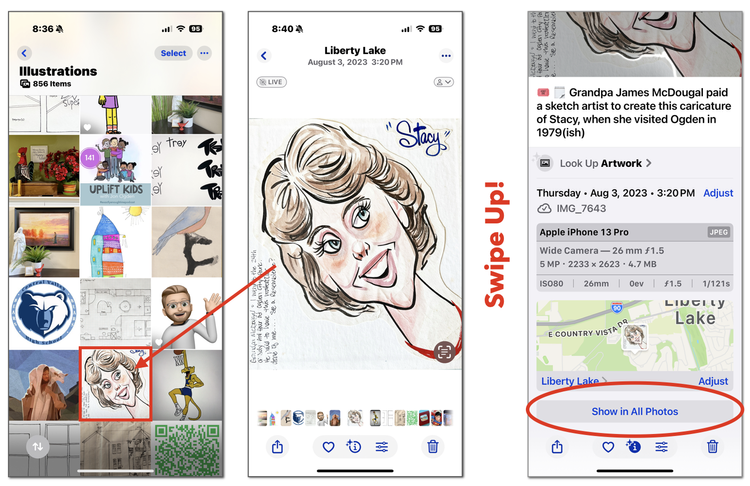
It’s called “Show in All Photos” and you’ll find it at the very bottom of the Photo Information area when you swipe up!
For example, I found this sketch of me in ‘Illustrations” and I can see the date I imported it into my library, but I want to see it in context—perhaps I imported other images that day too?
Tap to isolate the image you are curious about
Swipe up to reveal the Photo Information panel
Swipe up (again) to see “Show in All Photos” under the location
There it is. I remember I was working on a project with original photos from my childhood, so I must have found this sketch and taken a photo of it.
Now I can adjust the date to place it where it belongs chronologically.
Show in all photos places the current picture you're viewing among all the other pictures taken around that time. For example, you're viewing a featured photo, but when you press “Show in All Photos” you can view all the other photos taken around that same time frame.
p.s. Yes, you could just search the date the image was taken or imported, but this trick can save you time—give it a try TODAY!
Rock Your Scroll course login
To enter the Rock Your Scroll 2025 course page, simply click the orange button below and use the password: JOYonmyphone
Please NOTE: THE J-O-Y are capital letters and the rest are lower case.
If you need to log in again, click on the Courses tab on my website, www.stacyjulian.com. Scroll down to where all the course logins are located (look for circles!) and click on Rock Your Scroll 2025. Then enter the password and ready to rock!