$$PLAIN_TEXT_PREVIEW$$
Live Your Story with Stacy Julian

Hey friend,

As we begin to learn about albums this week, I want to share a super helpful feature with you today.

Which Album?

As you do your workflow to delete, favorite and caption images—do you sometimes wonder—have I already put this one in an album?

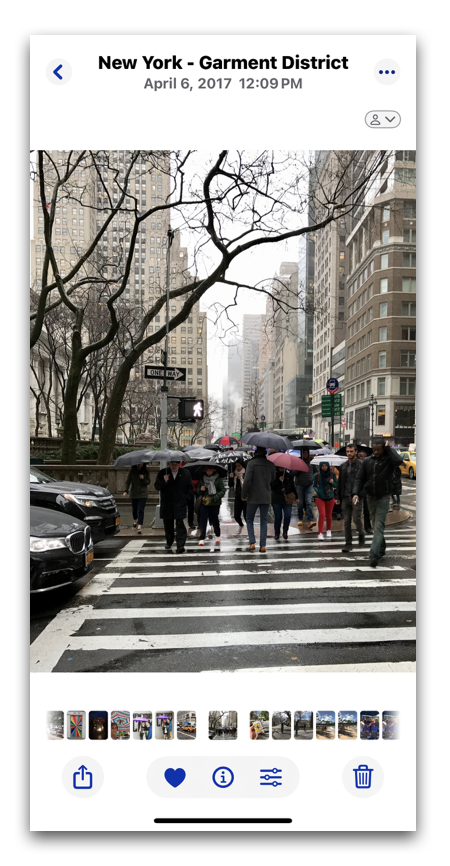
Yesterday during my ‘umbrella workflow’ I came across this photo. I LOVE this photo. It would be perfect in my Black & White color album, but is it already there?

Here’s how you and I can find out …

  1. Swipe up! This is (of course) where you will see the caption field. I have already added an 🗒️ emoji with some details, but when I …

  2. Swipe up some more! I can now SEE that I’ve also added this photo to THREE of my albums.

When I tap on that album locator field, it opens to show me the list of albums—or curated views—I will find this image in. Then when I tap on each album, it opens up so I can view it.

I LOVE that I can place an image in multiple views and I LOVE what this image adds to both of these albums. I want it in both—how cool and magical is photo management in 2025? It is …

100% AWESOME!


Keep going. You are well on your way to a personal, memory-packed version of “JOYonmyphone” and I’m so proud of you!


Rock Your Scroll course login

To enter the Rock Your Scroll 2025 course page, simply click the orange button below and use the password: JOYonmyphone

Please NOTE: THE J-O-Y are capital letters and the rest are lower case.

 Rock Your Scroll Login 

Password: JOYonmyphone

If you need to log in again, click on the Courses tab on my website, www.stacyjulian.com. Scroll down to where all the course logins are located (look for circles!) and click on Rock Your Scroll 2025. Then enter the password and ready to rock!

 
Live Your Story with Stacy Julian
pinterest facebook facebook instagram

Stacy Julian LLC, 21601 E. Mill River Ln, Liberty Lake, WA 99019, United States

Unsubscribe